gamingislove
So, I'll focus on #3 for now and just split it up and try to make it simpler.
3a). For the attack of opportunity, I am trying to trigger the "Use Battle Action" in two scenarios. One is when the combatant/grid user is moving into range of an enemy combatant and the second is when they are moving out of range, so move by and move in.
My first issue is the "move in/moving into range". The issue is that "In Range" from the "Grid Move Out Of Range" node seems to trigger regardless and ignore the actual battle range of the attack/ability.
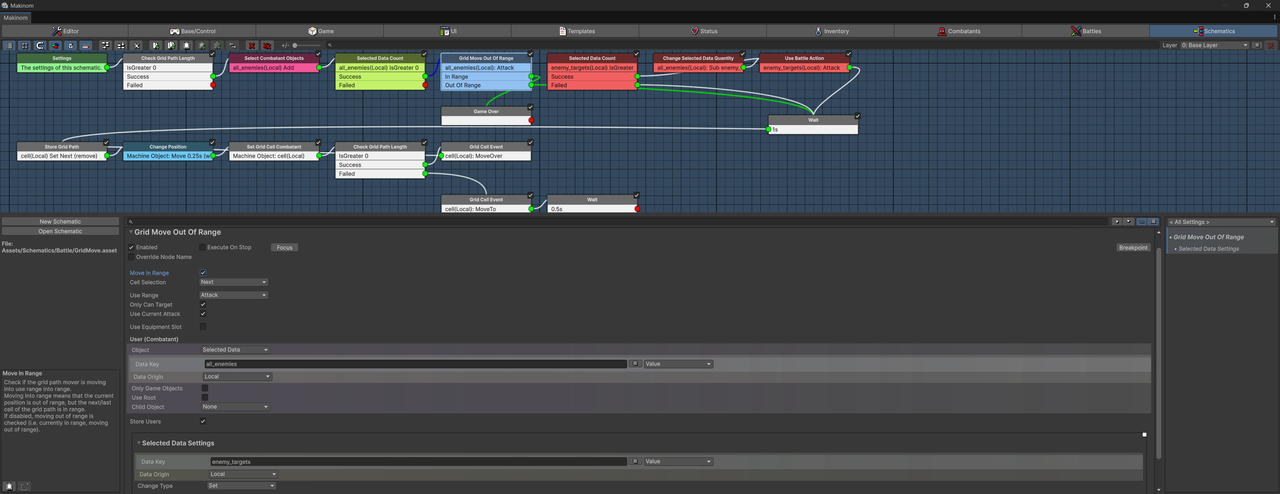
So, in the schematic, I've enabled "Move In Range" and even if I just move a single tile in any direction, "In Range" will trigger and trigger game over (used for testing). I also added an output to unity console log too.
It checks the use range "Attack", so here is the setup.

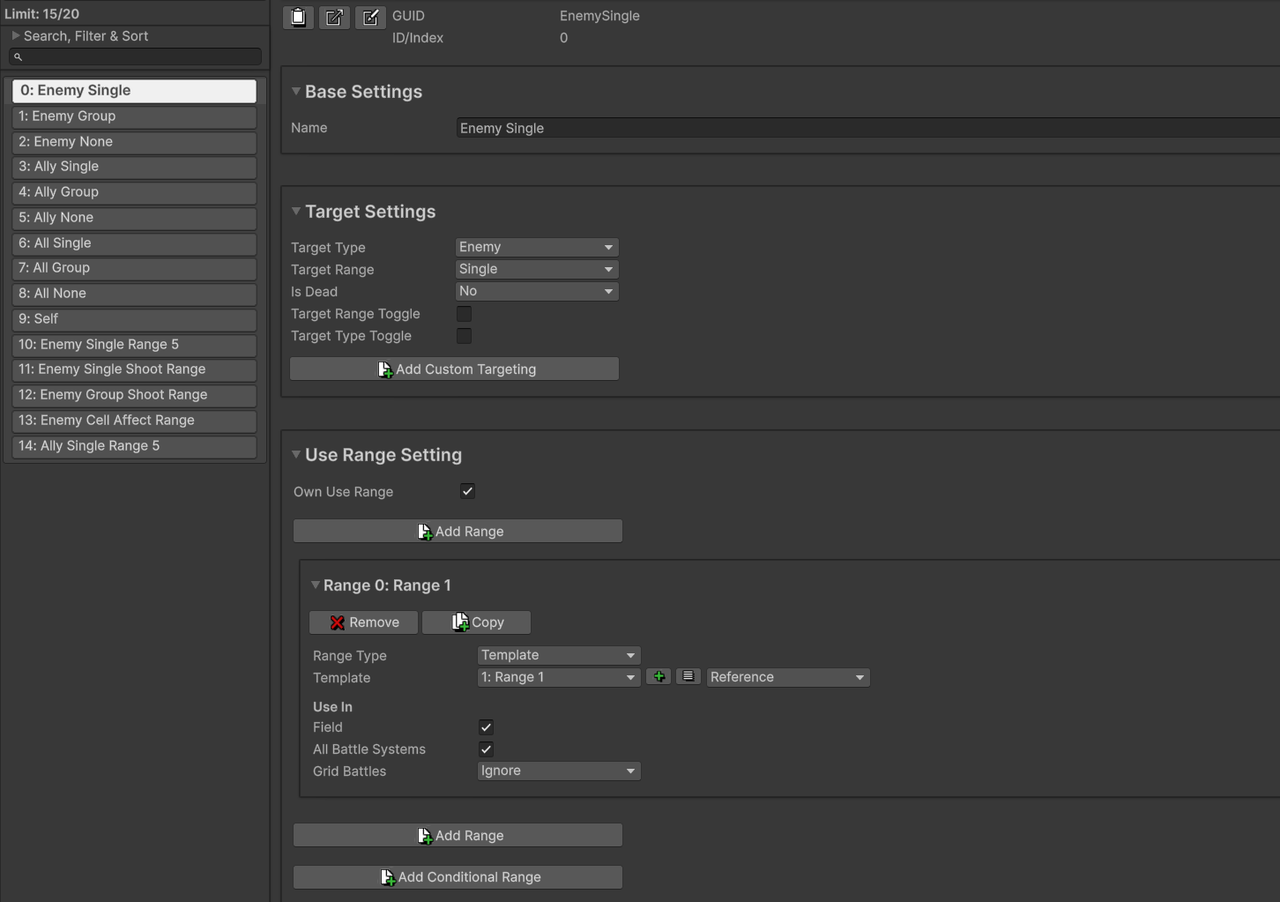
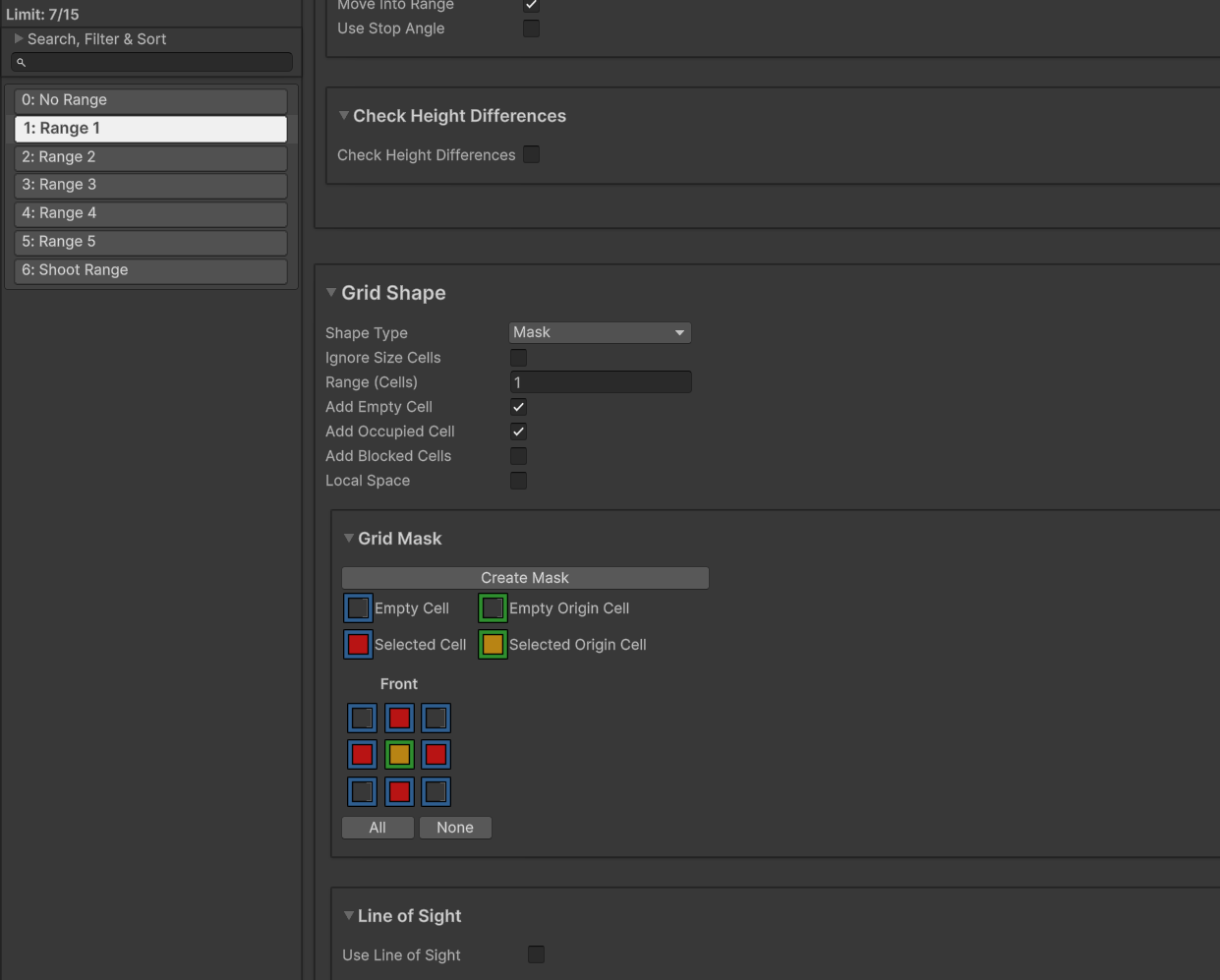
So yeah, based on that the "In Range" should only trigger when the combatant moves right up to the combatant, literally 1 tile away, yet it currently triggers even if you move just 1 tile up and you are like 6 tiles away.
I have this set up in a test project too, if you want me to send it over. It is based off the ORK 2D Grid project. The schematic is "Grid Move 1", just swap it out with the default schematic within move command.
3b). So, the other part of the problem is triggering the move by, IE when the combatant moves out of range. I have a much simpler schematic, I'm really hoping you can help me with this. Firstly, what node should I use then instead of "Change Selected Data Quantity" node?
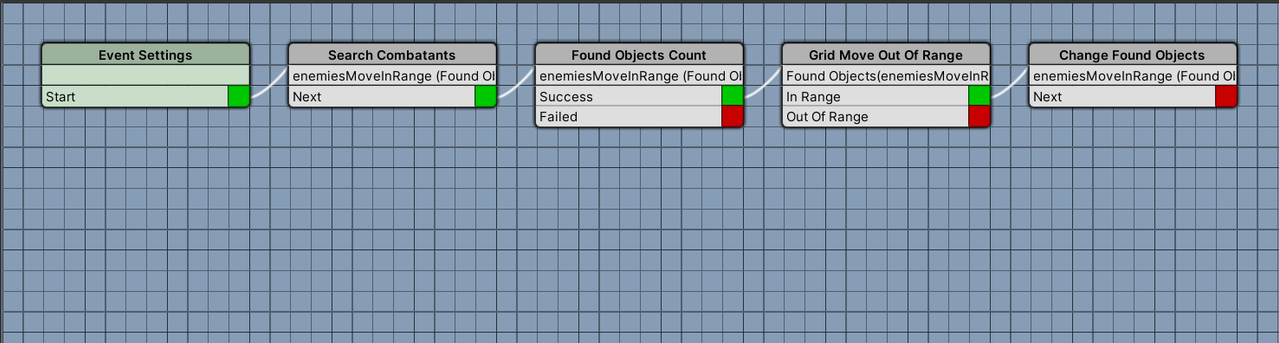
This is what the ORK 2 event looks like, based on the ORK Framework 2 mission grid battles.
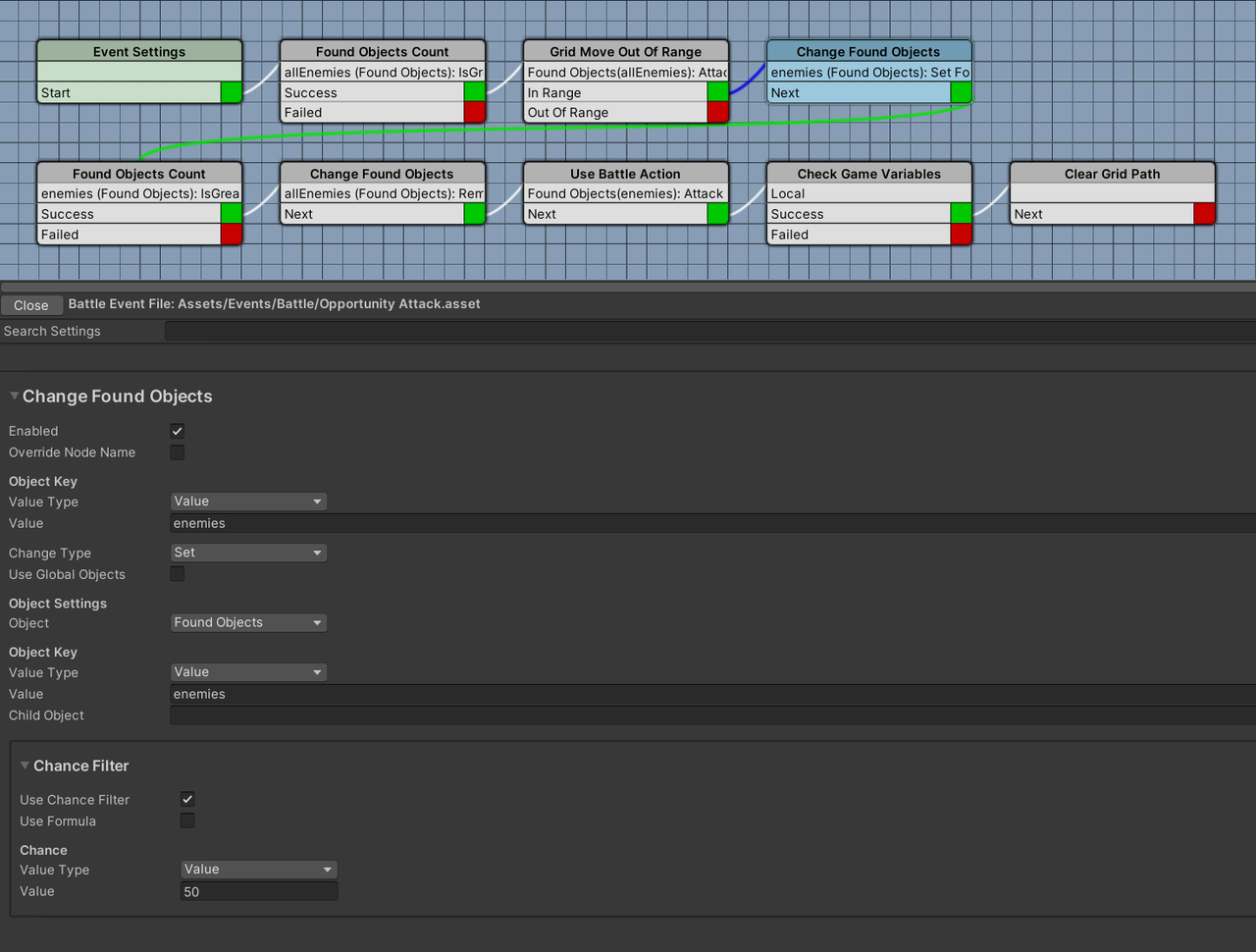
I'm trying to replicate that, I thought it would be straightforward, but I've been struggling for weeks to get this done lol. I'm trying to find the node to substitute "Change Found Objects". You mentioned it is not "Change Selected Data Quantity" node, so which node should I use in context of this schematic?
As noted above, I have a test project set up now that I can send over. The schematic that I have set up is called "Grid Move", not "Grid Move 1". "Grid Move" is defined in the grid movement by default.
3c). Similar to 3b but in the same schematic, "Grid Move", when I disable "Move In Range" in the "Grid Move Out Of Range" node, "In Range" does not trigger, it always fails and goes to "Out of Range". So yeah, never mind going to "Selected Data Count" or even the "Change Selected Data Quantity" node, which then leads to the "Use Battle Action" node, it always fails even when the range should be correct. It's based on "Attack" Use Range, which is just 1 tile, cell selection is next, so from what I understand it should be a success and trigger when the grid user of the grid movement schematic moves by an enemy combatant.
Or...is success and fail swapped? I read the tooltip and I thought "In Range" meant success?
Edit: God damn...so I think there's actually a bug with this "Grid Move Out Of Range" node! If I set "Use Range" to a battle template, aka the same battle template/target selection etc etc that my ability or base attack uses, then the Opportunity Attack triggers. Soon as I swap the "Use Range" back to either an ability or just base "Attack" it breaks and fails again.
3d). So, the "Grid Move Out Of Range" node's use range to battle template, will trigger the Opportunity Attack. However, there's more issues. If I am 1 tile away from the enemy combatant, so face to face and then I just move 1 tile away and the grid user combatant is killed by the Opportunity Attack, the prefab will still move to the destination cell after it gets killed. That's the first issue.
The second issue is I get this error below:
MissingReferenceException: The object of type 'GamingIsLove.Makinom.Components.UIColorChanger' has been destroyed but you are still trying to access it.
Your script should either check if it is null or you should not destroy the object.
UnityEngine.Object+MarshalledUnityObject.TryThrowEditorNullExceptionObject (UnityEngine.Object unityObj, System.String parameterName) (at <d35f3fd492a14898b9e7cb0372b7ba3d>:0)
UnityEngine.Bindings.ThrowHelper.ThrowNullReferenceException (System.Object obj) (at <d35f3fd492a14898b9e7cb0372b7ba3d>:0)
UnityEngine.Behaviour.get_isActiveAndEnabled () (at <d35f3fd492a14898b9e7cb0372b7ba3d>:0)
GamingIsLove.Makinom.Components.UIColorChanger.UpdateColors (UnityEngine.Color color, System.Boolean isFlash) (at <bc256f5028ce44f19d857b0a10374b72>:0)
GamingIsLove.Makinom.Components.HUDComponent.Clear () (at <bc256f5028ce44f19d857b0a10374b72>:0)
GamingIsLove.Makinom.Components.HUDComponent.DoClosed () (at <bc256f5028ce44f19d857b0a10374b72>:0)
GamingIsLove.Makinom.Components.HUDComponent.Closed () (at <bc256f5028ce44f19d857b0a10374b72>:0)
GamingIsLove.Makinom.UI.UIStateChange.Use (GamingIsLove.Makinom.BaseWaitForAnim waitForAnim, GamingIsLove.Makinom.Notify callback, System.Boolean wait) (at <bc256f5028ce44f19d857b0a10374b72>:0)
GamingIsLove.Makinom.Components.HUDComponent.DoClose () (at <bc256f5028ce44f19d857b0a10374b72>:0)
GamingIsLove.Makinom.Components.HUDComponent.Close () (at <bc256f5028ce44f19d857b0a10374b72>:0)
GamingIsLove.ORKFramework.UI.LatestTurnHUDInstance.UpdateLatestTurn (GamingIsLove.ORKFramework.Combatant combatant) (at <5ff43a3101e74ca4ae68fee2c8165b6a>:0)
GamingIsLove.ORKFramework.Battle.FireLatestTurn (GamingIsLove.ORKFramework.Combatant combatant) (at <5ff43a3101e74ca4ae68fee2c8165b6a>:0)
GamingIsLove.ORKFramework.PhaseBattleSystem.CombatantCanceled (GamingIsLove.ORKFramework.Combatant user, System.Boolean unsetLatestTurn) (at <5ff43a3101e74ca4ae68fee2c8165b6a>:0)
GamingIsLove.ORKFramework.PhaseBattleSystem.CombatantSelected (GamingIsLove.ORKFramework.Combatant combatant) (at <5ff43a3101e74ca4ae68fee2c8165b6a>:0)
GamingIsLove.ORKFramework.PhaseBattleSystem.Tick () (at <5ff43a3101e74ca4ae68fee2c8165b6a>:0)
GamingIsLove.ORKFramework.Battle.Tick () (at <5ff43a3101e74ca4ae68fee2c8165b6a>:0)
GamingIsLove.Makinom.Maki.FireTick () (at <22800e737de149848611b4b2136772ff>:0)
GamingIsLove.Makinom.MakinomHandler.Update () (at <22800e737de149848611b4b2136772ff>:0)
Sometimes, I'll also get this error, I believe it is different to the error above. Error 2:
MissingReferenceException: The object of type 'GamingIsLove.Makinom.Components.UIColorChanger' has been destroyed but you are still trying to access it.
Your script should either check if it is null or you should not destroy the object.
UnityEngine.Object+MarshalledUnityObject.TryThrowEditorNullExceptionObject (UnityEngine.Object unityObj, System.String parameterName) (at <d35f3fd492a14898b9e7cb0372b7ba3d>:0)
UnityEngine.Bindings.ThrowHelper.ThrowNullReferenceException (System.Object obj) (at <d35f3fd492a14898b9e7cb0372b7ba3d>:0)
UnityEngine.Behaviour.get_isActiveAndEnabled () (at <d35f3fd492a14898b9e7cb0372b7ba3d>:0)
GamingIsLove.Makinom.Components.UIColorChanger.UpdateColors (UnityEngine.Color color, System.Boolean isFlash) (at <bc256f5028ce44f19d857b0a10374b72>:0)
GamingIsLove.Makinom.Components.HUDComponent.Clear () (at <bc256f5028ce44f19d857b0a10374b72>:0)
GamingIsLove.Makinom.Components.HUDComponent.DoClosed () (at <bc256f5028ce44f19d857b0a10374b72>:0)
GamingIsLove.Makinom.Components.HUDComponent.Closed () (at <bc256f5028ce44f19d857b0a10374b72>:0)
GamingIsLove.Makinom.UI.UIStateChange.Use (GamingIsLove.Makinom.BaseWaitForAnim waitForAnim, GamingIsLove.Makinom.Notify callback, System.Boolean wait) (at <bc256f5028ce44f19d857b0a10374b72>:0)
GamingIsLove.Makinom.Components.HUDComponent.DoClose () (at <bc256f5028ce44f19d857b0a10374b72>:0)
GamingIsLove.Makinom.Components.HUDComponent.Close () (at <bc256f5028ce44f19d857b0a10374b72>:0)
GamingIsLove.ORKFramework.UI.LatestTurnHUDInstance.Close () (at <5ff43a3101e74ca4ae68fee2c8165b6a>:0)
GamingIsLove.Makinom.UI.HUDInstance.Tick () (at <22800e737de149848611b4b2136772ff>:0)
GamingIsLove.Makinom.UI.BaseUIHandler.Tick () (at <22800e737de149848611b4b2136772ff>:0)
GamingIsLove.Makinom.Maki.FireTick () (at <22800e737de149848611b4b2136772ff>:0)
GamingIsLove.Makinom.MakinomHandler.Update () (at <22800e737de149848611b4b2136772ff>:0)
I got the second error when I ran past two enemy combatants with the destination cell being 1 tile to the left of them, the enemy combatants where standing shoulder to shoulder in a line. The first error triggers when grid movement starts 1 tile away from an enemy then moving 1 tile away and getting killed. The second one starts when grid movement starts out of use range of enemy targets, but then I enter use range, (1 tile) and run past them in a line and get killed. So basically, I think it's triggering the "looping" part of the grid movement schematic where it checks for a continuing path since the grid user is not just moving 1 tile up but moving across multiple tiles. In my own schematic I basically have to call the "opportunity attack" part of the schematic twice, one when just moving 1 tile and a second time when moving multiple tiles to check both scenarios of if the grid movement user is moving away from an enemy combatant.
Also, both of these errors only trigger after runtime is finished. I'll exit the game and then in the Unity editor, I'll see the errors after I exit out from runtime testing.
Edit: So, it seems my "Check Variable" was failing and the "Clear Grid Path" node was not triggering and I guess that would solve the issue of the dead combatant still moving to the tile after it was killed by the opportunity attack? However, I still don't know what the error is for.
Setup:
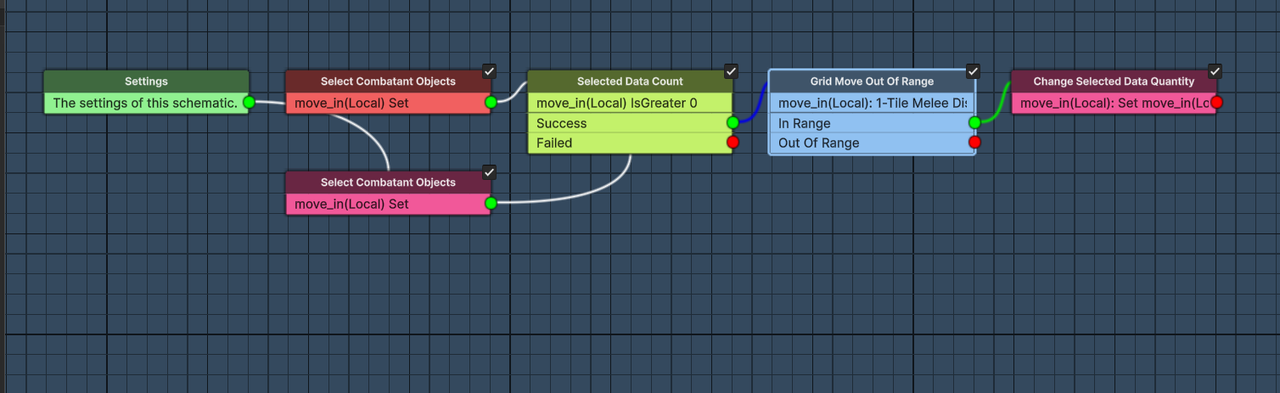
This is what my own schematic for the opportunity attack looks like, I guess it's slightly different to the test project's one (which I haven't sent yet), in that it doesn't have the "Clear Grid Path" node. The "test project" schematic is shown in 3a, just with the nodes connected.

3e). I kinda got "move in" opportunity attacks to work by changing the "Grid Move Out of Range" node to use a battle range template as the use range (as explained in the issues above), however I still get errors after I exit runtime.
It's odd though because it only happens in one case. So after the grid user moves right up to the combatant (1 tile away) and the opportunity attack triggers, if the combatant dies then, then you'll get the error after you exit runtime, similar to above.
However, if rather than ending the cell path right next to the enemy combatant, if I end the path to the side of the enemy combatant, aka 1 tile away but the cell path still passes by the enemy combatant, then the error doesn't appear. I guess is it because "move by" triggers rather than "move in"? Or shouldn't both trigger in this case?
Error:
MissingReferenceException: The object of type 'GamingIsLove.Makinom.Components.UIColorChanger' has been destroyed but you are still trying to access it.
Your script should either check if it is null or you should not destroy the object.
UnityEngine.Object+MarshalledUnityObject.TryThrowEditorNullExceptionObject (UnityEngine.Object unityObj, System.String parameterName) (at <d35f3fd492a14898b9e7cb0372b7ba3d>:0)
UnityEngine.Bindings.ThrowHelper.ThrowNullReferenceException (System.Object obj) (at <d35f3fd492a14898b9e7cb0372b7ba3d>:0)
UnityEngine.Behaviour.get_isActiveAndEnabled () (at <d35f3fd492a14898b9e7cb0372b7ba3d>:0)
GamingIsLove.Makinom.Components.UIColorChanger.UpdateColors (UnityEngine.Color color, System.Boolean isFlash) (at <bc256f5028ce44f19d857b0a10374b72>:0)
GamingIsLove.Makinom.Components.HUDComponent.Clear () (at <bc256f5028ce44f19d857b0a10374b72>:0)
GamingIsLove.Makinom.Components.HUDComponent.DoClosed () (at <bc256f5028ce44f19d857b0a10374b72>:0)
GamingIsLove.Makinom.Components.HUDComponent.Closed () (at <bc256f5028ce44f19d857b0a10374b72>:0)
GamingIsLove.Makinom.UI.UIStateChange.Use (GamingIsLove.Makinom.BaseWaitForAnim waitForAnim, GamingIsLove.Makinom.Notify callback, System.Boolean wait) (at <bc256f5028ce44f19d857b0a10374b72>:0)
GamingIsLove.Makinom.Components.HUDComponent.DoClose () (at <bc256f5028ce44f19d857b0a10374b72>:0)
GamingIsLove.Makinom.Components.HUDComponent.Close () (at <bc256f5028ce44f19d857b0a10374b72>:0)
GamingIsLove.ORKFramework.UI.LatestTurnHUDInstance.Close () (at <5ff43a3101e74ca4ae68fee2c8165b6a>:0)
GamingIsLove.Makinom.UI.HUDInstance.Tick () (at <22800e737de149848611b4b2136772ff>:0)
GamingIsLove.Makinom.UI.BaseUIHandler.Tick () (at <22800e737de149848611b4b2136772ff>:0)
GamingIsLove.Makinom.Maki.FireTick () (at <22800e737de149848611b4b2136772ff>:0)
GamingIsLove.Makinom.MakinomHandler.Update () (at <22800e737de149848611b4b2136772ff>:0)
Setup:
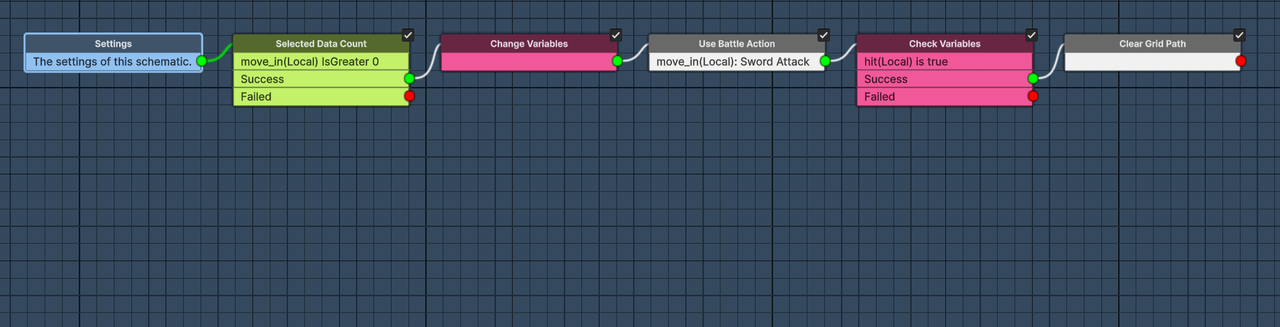
For the "move in" opportunity attack, I have two separate schematics. I call the first one before the grid movement and the second schematic, after the grid movement, basically similar to how the ORK 2 mission grid battles is setup.
Before Main Grid Movement Schematic:
After Main Grid Movement Schematic:
Compared to ORK 2 events:

I double checked to see if the "errors" would happen due to normal deaths. What I mean by that is aka your player combatant gets killed by the enemy during their turn. But no, it seems the error only happens when a combatant gets killed via moveIn, normal kills not triggered by "Use Battle Action" don't result in the error, so it does seem somehow tied to my setup for these moveIn/moveBy actions.
3f). I have this really weird issue where I use the same schematic in two different projects, but it works in one project and not the other.
This is related to 3e. If you refer to the "After Main Grid Movement Schematic", so this is the third schematic that I define, that should trigger the moveIn opportunity attack. In my testing project it triggers when I move in and stop 1 tile from an enemy combatant, the opportunity attack triggers. But in my main project, when I try to use this schematics, the MoveIn Opportunity attack doesn't trigger.
I've used literally the exact same schematics, in both projects and set them up exactly the same way.
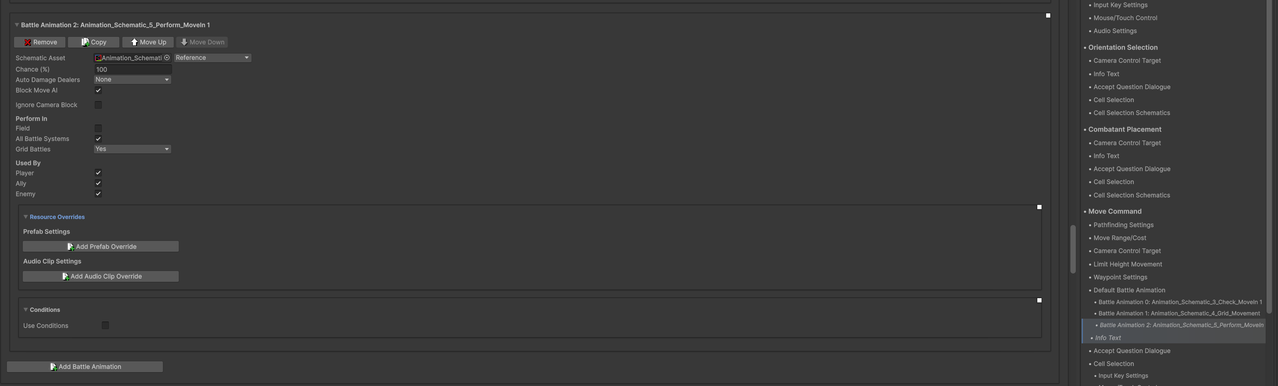
They all use the exact same settings above ^ for all three schematics related to grid movement in both project.
Issue: I've found out that for some reason, in my main project, that "Selected Data Count" fails in my main project. IE referring to "After Main Grid Movement Schematic", I check for "move_in" via a "Select Combatant Objects" node in "Before Main Grid Movement Schematic". I store it there, within the first schematic "Select Data Count" succeeds and goes to "Grid Move Out Of Range" node. However, when it checks it again, in the last schematic, it fails.
I don't know why it works in one project and why it fails in another project, are there extra settings that I've enabled somewhere that I have forgotten? The selected data is local, like some setting where local selected data is shared amongst schematics or something?

This extra node in the red box, in my test project I don't need to add this node again, it's only used once in the first schematic, before the main grid movement schematic. However in my main build, the only way I can get "Use Battle Action" to trigger is to use the "Select Combatant Objects" node again, otherwise "Selected Data Count" will fail. And that is the crux of my issue, where there is a difference between the two projects. I've also made sure to update my main project build to the latest version of ORK 3, I've tried to rule out all the differences, but still can't solve it. It's doing my head in lol.


