Hello! ^^
Sorry but i am really busy these days. :)
However, as GiL pointed out, it is quite simple to achieve a window like mine.
First of all i suggest following all the tutorial, so you can understand properly the process and set up things with small effort.
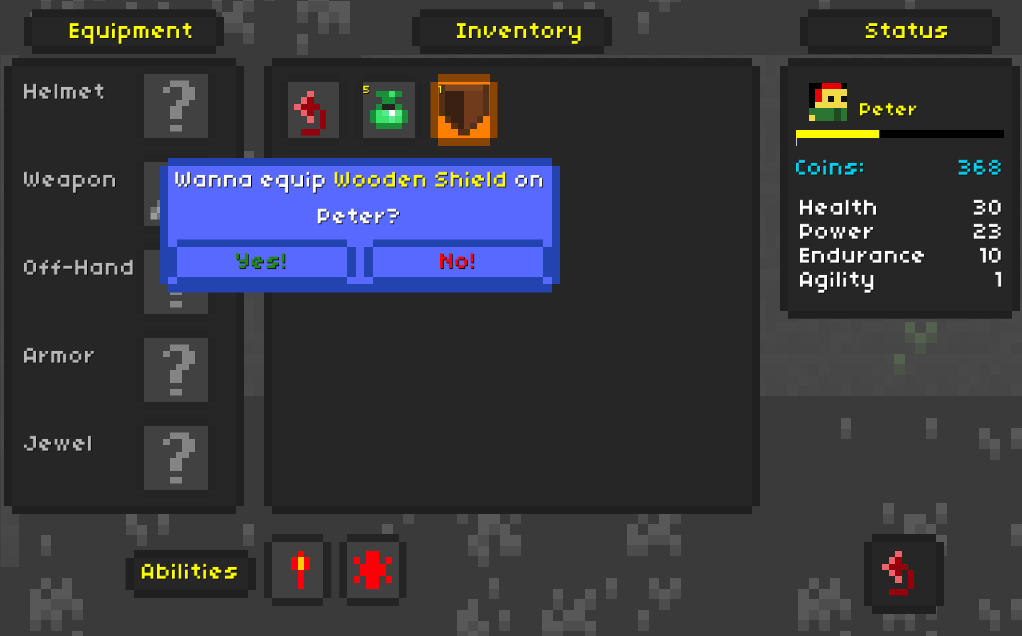
My window is a simple menu screen called by general menu, but it could be set up to be called directly from the game.
Single options are up to you (pause/freeze game, called by key, menu user...), but general setup is a single window with many individual menu tabs. In particular i used:
- Equipment tab without equipment box (so you have equipment slots but not all equipment available, you will use inventory directly for this!)
- Inventory tab with all possible items, so you can directly equip weapons/armors from there
- Status tab (set like the one in tutorial, i just added combatant icon)
- Ability tab for available abilities
- A description tab called when the item / ability is clicked
- Usage tab (the blu one in the screenshot): here i use a custom quantity selection tab set up in a tricky way, and only possible if your menu user is single (no parties or multiple combatant), so i would wait for this one...
Then you just create default Gui boxes to occupy different part of the screen.
It is not that difficult after you learn using ORK a bit, honestly some users achieved some inventory / character tabs far more detailed than mine. :D